Patch Management: Getting a Security Fix Onto Every System That Needs It
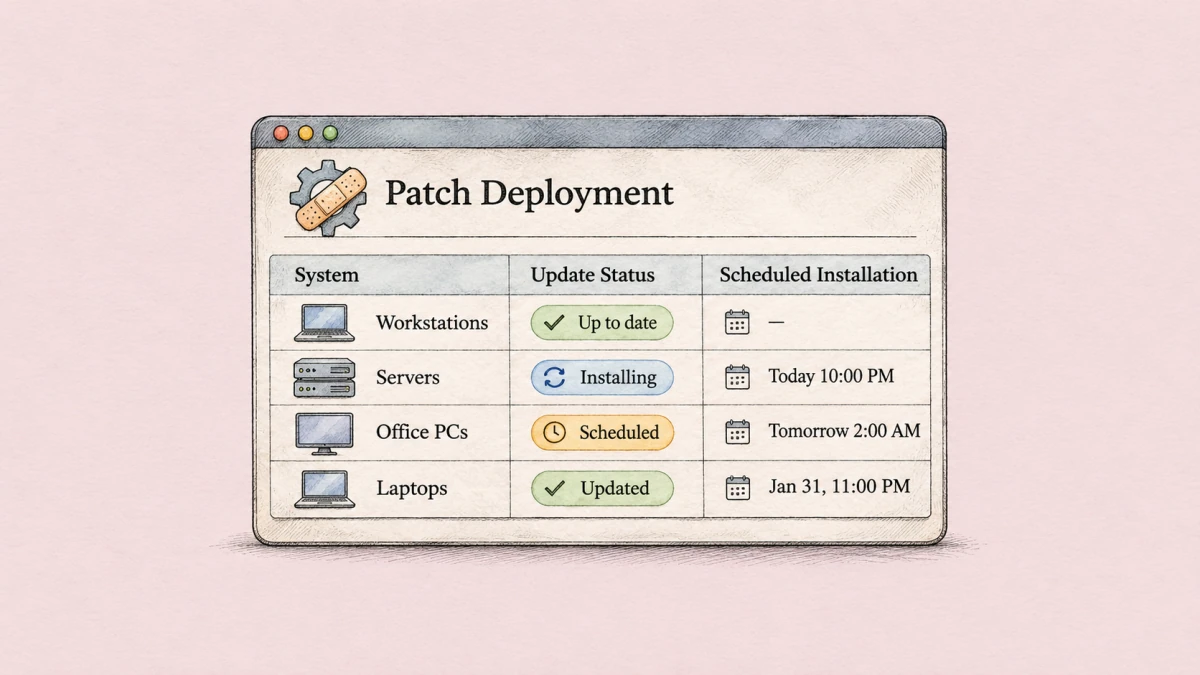
A software maker releases a security fix. For an organization using that software, the next job is to find every affected installation—including the ones nobody has thought about lately. Patch management turns the available fix into a coordinated change across the systems that need it.
A patch changes existing software to fix or improve it. Managing those changes means identifying, prioritizing, obtaining, installing and verifying the patches an organization needs. It reaches applications, operating systems and firmware, the software that helps devices operate. Office computers are only part of the picture; mobile devices, cloud systems and equipment controlling physical processes may need attention too.
The National Institute of Standards and Technology's enterprise patch-management guide treats this as ongoing technology maintenance.
Why That Update Is Worth Installing
Find the Systems—and the People Responsible
The vendor's notice identifies affected software and versions. The organization needs to match that information with what it actually runs.
An inventory of information technology assets, such as computers and software, helps, provided it keeps pace with new systems and changes. A forgotten service won't announce its absence from the list. A report showing every listed system as updated can therefore look successful while overlooking the missing one.
Each affected system also needs an owner who can arrange the change. That person needs to know what depends on the software, who has access to maintain it and when an interruption is possible. These details turn a general instruction to update into work someone can carry out.
Urgency Comes From Exposure and Consequences
The next decision is how quickly to act. Release order alone doesn't answer it. A weakness attackers are already exploiting, on a service they can reach, may deserve different treatment from a less exposed problem.
The Cybersecurity and Infrastructure Security Agency's Known Exploited Vulnerabilities data can supply evidence for that judgment. The catalog identifies vulnerabilities known to be exploited; it doesn't contain every weakness or prove that the organization itself has been attacked.
The owner then obtains the authentic update and checks how it will affect the service. Testing can reveal compatibility problems, while a recovery plan prepares for trouble during rollout. The depth and timing of those preparations depend on the risk and the system. Routine maintenance and an urgent fix may need different schedules.
When no patch is available or an immediate change isn't feasible, the system still needs a recorded response. A supported workaround or restricted exposure may reduce risk. That mitigation, a measure that reduces risk, should remain visible as a temporary response with an owner and a review point.

- Know which cable goes where the next time something stops working.
- Tag laptops, drives and chargers so nothing in the office goes missing unnoticed.
- Reprint your most-used labels in seconds from the built-in memory.
Confirm the Change Reached the Running Software
A downloaded package doesn't establish that it was installed. Installation doesn't always establish that corrected code is running; a restart or other activation step may remain.
Patching includes completing the relevant change and checking its effect. At the organization level, useful reporting shows important gaps, who owns them and what remains to be done. A single completion percentage can hide those details.
Verification continues after the initial rollout because systems keep changing. A device reset or restoration from an older backup can bring back an unpatched version. Rolling back a troublesome update may do the same. The service may be working again, while the earlier security exposure has returned with it.
IT Assets: Finding the Computers That Need a Fix

Configuration Management: Stop Losing Track of System Changes
Vulnerability Scans: What Could the Scanner Actually See?
QUOTE:
"Amateurs hack systems, professionals hack people."