What Is the Internet? The Networks Behind Your Apps

The internet is a global collection of connected networks. It lets separately run systems exchange data, so websites, email, and video calls can all travel over the same internet connection.
No single company owns the whole thing. As the Internet Society explains, providers, businesses, universities, governments, and other organizations operate networks that connect through shared technical standards.
A standard defines agreed ways of doing something, such as addressing or exchanging data. Those common rules let equipment from different makers communicate.
From your device to another network
At home, your laptop might first connect through Wi-Fi, a wireless link to your local network. A router forwards traffic between networks, including from that local network toward your internet service provider, or ISP.
The ISP supplies your connection to the wider internet. Traffic can pass through its network and other connected networks on the way to the service you're using.
An internet connection might arrive over fiber, cable, mobile radio, or a satellite link; Wi-Fi describes the nearby wireless connection to your device.

- Give every phone, laptop and TV a steadier connection with Wi-Fi 6.
- Stop the buffering at busy hours, with room for many devices at once.
- Replace an aging router and get stronger coverage across more of your home.
A full Wi-Fi signal therefore doesn't prove that your ISP connection is working. You can have a good local link while the route beyond it is unavailable.
Data travels in packets
A photo or message doesn't have to travel as one enormous piece. Network software carries data in packets, smaller units with information that helps deliver them.
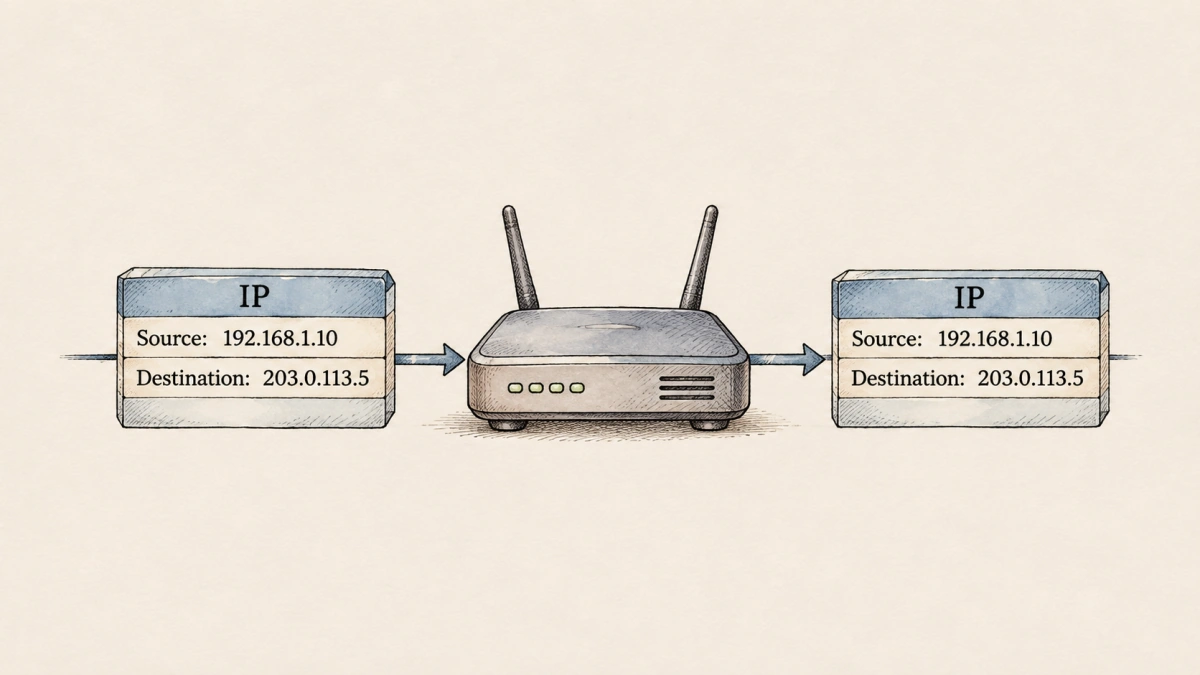
The Internet Protocol, or IP, provides rules for addressing and moving these packets between networks. An IP address is a numeric address used for network delivery, as described in the specification for IP version 4.
Routers use delivery information to choose where a packet should go next. A destination address helps with that choice; it doesn't tell a router whether the contents are a trustworthy shopping offer or a family photograph.
IP alone doesn't promise that every packet will arrive. Other communication rules and the applications using them handle matters such as recovering missing data when their service requires it.
The Whole Internet, Explained in Nine Minutes
The web is one service on the internet
The World Wide Web consists of linked pages and other resources that browsers retrieve from web servers. A web server is software that handles those requests and sends responses.
Email, file transfers, and other services also use the internet. You might read email through a web page, but that doesn't make the entire email system part of the web.
MDN's explanation of internet infrastructure draws this distinction between the underlying networks and the services built on them.
It matters when something fails: one website being unavailable doesn't mean your whole internet connection has stopped working.
Security depends on what's using the connection
An internet connection supplies a route for data. The protections applied to that data depend on the devices, software, and services involved.
For web browsing, HTTPS, short for Hypertext Transfer Protocol Secure, protects communication between your browser and a server with encryption. Encryption turns readable information into a protected form that requires the right key to read, as MDN's HTTPS overview explains.
The service still receives the information you send it. A protected connection helps keep outsiders from reading the exchange; deciding what to share with the service remains a separate choice.
Internet Protocol: What IP Does for Every Packet
Autonomous Systems: The Networks That Make an Internet
How DNS Finds an Answer Without One Giant Directory
QUOTE:
"Amateurs hack systems, professionals hack people."