Configuration Management: Stop Losing Track of System Changes
Two computers set up the same way can behave differently after months of small changes. Configuration management keeps track of how systems should be set up, how they actually are set up, and what changed between the two.
A system's configuration includes its settings, installed software versions, and relevant components. It can determine who can sign in, which connections are allowed, and whether useful records are kept.
Configuration management assigns responsibility for those details and a controlled way to change them.
Why That Update Is Worth Installing
Establish a reference worth comparing against
An approved baseline describes the expected configuration at a particular point in time. It's the reference used to check systems and assess proposed changes.
The National Institute of Standards and Technology (NIST) configuration-management guide emphasizes maintaining approved baselines and controlling their changes. A baseline should evolve as requirements, software, and security needs change.
For a work laptop, it might specify supported software, required security settings, and which users can install applications. A computer running a company website may need a different baseline because it does a different job.
“Set up securely” doesn't tell a technician whether remote access should be enabled or which accounts may use it.
A temporary fix can become a permanent surprise
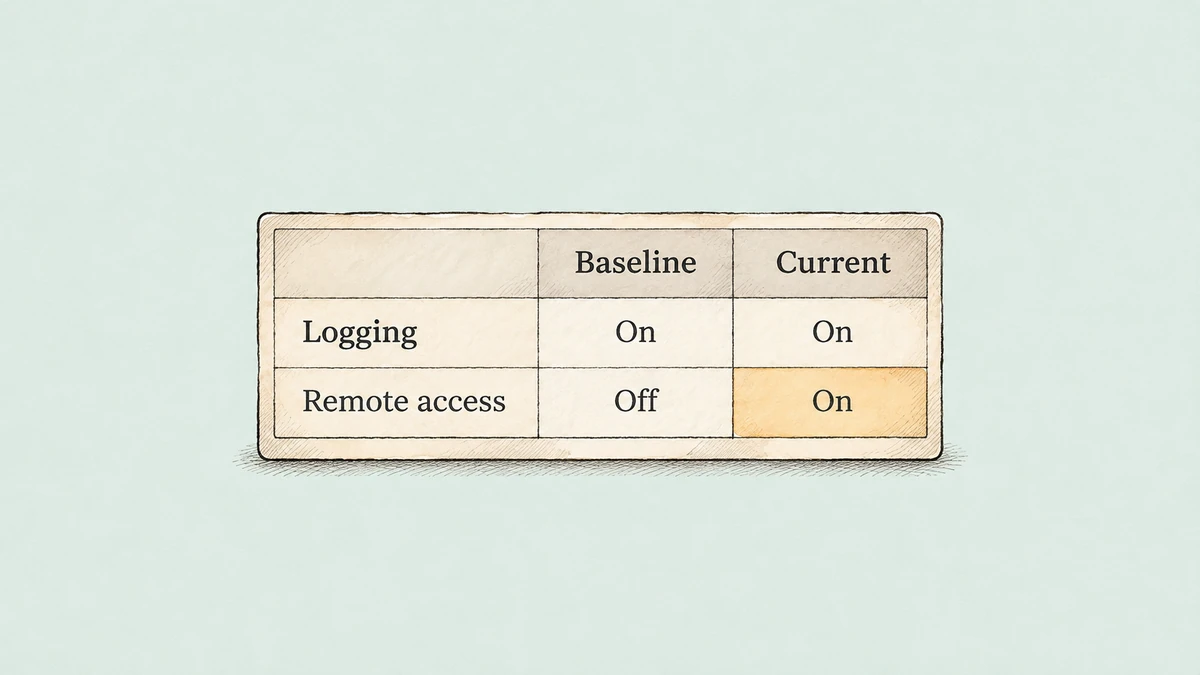
Suppose a technician disables a system's logging, the recording of events, while investigating a problem. The immediate issue disappears, but the technician forgets to turn logging back on.
Users may notice nothing, while the security team later discovers that expected records weren't being collected.
That difference between the approved setup and the actual setup is configuration drift. It can result from troubleshooting, missed updates, unrecorded changes, or deliberate interference.
Finding drift starts a review; it doesn't prove an attack. The team needs to establish whether the difference is an approved exception, an error to correct, or suspicious activity that needs investigation.

- Run a test server or a home lab without giving up desk space.
- Start right away with 16GB of memory and a 500GB SSD already inside.
- Drive two 4K screens when it doubles as an everyday desktop.
Give changes a traceable route into the system
NIST's configuration-change controls cover review, approval, testing, implementation, and retained records. In everyday work, that means answering a few practical questions:
- What needs to change, and why? Record the system, proposed change, and person responsible.
- What could it affect? Consider security, connected services, and the people who depend on them.
- How will it be checked? Test the intended behavior and confirm that necessary protections still work.
- What happens if it fails? Prepare a recovery approach, including a way to return to an earlier configuration where appropriate.
After the change, verify the actual result and update the records. An approved request doesn't establish that the right settings reached every intended device.
Urgent repairs may need an expedited process. They still need an accountable decision and a record of what was done, so the emergency doesn't leave an unexplained setup behind.
What Is DevSecOps?
Automation makes consistency easier
Tools can compare many systems with a desired configuration and apply changes across them. For example, Ansible uses files called playbooks to describe tasks and the desired state of systems.
Keeping configuration instructions in files also makes them easier to review before they're applied. This approach is often called configuration as code.
Version control records changes to files over time. As the Git project's introduction explains, it lets teams compare versions and retrieve earlier ones.

- Know which cable goes where the next time something stops working.
- Tag laptops, drives and chargers so nothing in the office goes missing unnoticed.
- Reprint your most-used labels in seconds from the built-in memory.
That history helps explain what changed, but it doesn't prove that a change was safe or that a device received it. A mistaken instruction can be applied consistently to many machines, which makes testing and verification just as important with automation.
Keep the recovery promise realistic
Restoring an earlier configuration can undo a setting change. It won't necessarily recover business records that were deleted while the faulty configuration was active.
Configuration records therefore complement backups, which preserve copies of data for recovery. They're different pieces of the recovery job.
When something breaks, an accurate change history gives the team specific differences to investigate. It narrows the search without pretending that the last change must have caused the problem.
System Hardening: Closing the Openings You Don’t Need
Patch Management: Getting a Security Fix Onto Every System That Needs It
System Integrity: Is the Computer Still Doing Its Intended Job?
QUOTE:
"Amateurs hack systems, professionals hack people."