Clickjacking: The Hidden Button Behind the Click You Meant
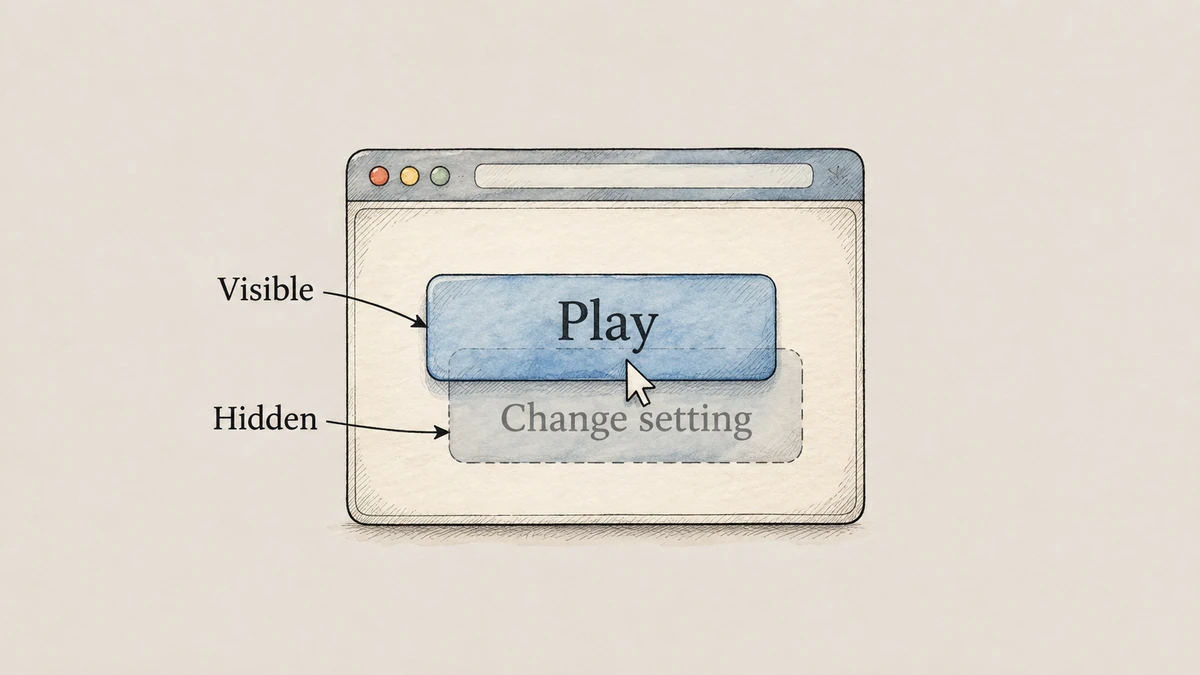
You click a button marked “Play,” but the browser registers a click on an account setting you never saw. The mouse went exactly where you aimed; the page misled you about what was there.
Clickjacking tricks someone into activating a different control from the one they think they're choosing. A common web version places an invisible or disguised interactive page over a convincing decoy.
The attack is also called UI redressing, meaning the user interface—the buttons, forms, and other controls you interact with—has been dressed up to misrepresent the action. OWASP's description explains how layered pages can redirect a person's clicks this way.
The Invisible Button Under Your Click
The hidden button can be real
Imagine a decoy page offering a video. An attacker embeds a vulnerable account-settings page and aligns one of its controls with the visible Play button, while making the embedded page hard to see.
That embedded page may sit in an iframe, a browser feature that displays one webpage inside another. If your signed-in account works in the embedded page, the click can carry out an action using your existing access.
The attacker doesn't necessarily need to know your password.
Success depends on the target page allowing the embedding and the action, along with the browser's handling of login information and other checks. Clickjacking doesn't automatically grant complete control of a device or bypass every confirmation screen.
It also isn't simply another name for a fake advertisement or misleading download link. The distinctive trick is directing your interaction to a control whose real purpose or position has been concealed.
Why an ordinary request check may miss it
Cross-site request forgery, or CSRF, tricks a browser into sending an unwanted request to another site. Applications often defend against it by requiring a special value in the request that an outside site shouldn't know.
Clickjacking can instead make you interact with the genuine page, which already has that value. PortSwigger explains why a CSRF token doesn't stop this: the request can look normal even though the user misunderstood the action.
The missing check concerns what you're knowingly approving.

- Catch the threats a built-in antivirus can miss.
- Get blocked from malicious sites before they load.
- Protect your devices around the clock, not only when you run a scan.
Stop unwanted pages from embedding yours
Website owners can tell browsers where their pages may be embedded using Content Security Policy, or CSP. It's a set of browser instructions delivered with the page; the frame-ancestors rule controls which surrounding pages may contain it.
For a page that never needs embedding, the response can include:
Content-Security-Policy: frame-ancestors 'none'
This is an HTTP response header, information the server sends alongside the page's content. It blocks framing in browsers that enforce the policy, including framing by the site's own pages.
How One Tweet Started Retweeting Itself
If embedding is needed, the policy can allow specific trusted sites instead. MDN's documentation highlights an easy mistake: this rule doesn't work as a meta tag, a setting written inside the webpage itself.
In plain terms, put the restriction in the server's response, and explicitly set the rule that controls embedding. Test both forbidden embedding and the legitimate integrations the site needs.
The older X-Frame-Options header can also block embedding with its DENY setting. Where an application needs more flexible rules for trusted sites, CSP's frame-ancestors provides them.

- Learn to find the flaws in a web app before someone else does.
- Understand injection, broken logins and logic bugs well enough to fix them.
- Build the skills that web security jobs ask for.
The defenses have boundaries
Cookies are small pieces of data browsers send back to websites, often to maintain a login. Their SameSite setting can stop login cookies from accompanying certain requests made through other sites, reducing attacks that depend on an authenticated embedded page.
That doesn't block embedding itself or protect actions that need no login. OWASP recommends combining defenses and notes that frame restrictions don't cover every variation of the trick.
For example, DoubleClickjacking uses separate windows and a misleading double-click, rather than an embedded page. Sensitive actions need clear, deliberate approval that the server verifies; another easily misplaced button alone isn't a complete defense.
As a visitor, leave pages that demand odd clicks or unexpected approvals, and open sensitive account settings directly through the service you intend to use. You shouldn't have to spot an invisible layer to keep a website from accepting the wrong action.
Link-Jacking: When a Familiar Link Takes a Detour
Cross-Site Scripting: When a Webpage Treats Text as Instructions
HTML: How Tags Turn Content Into a Web Page
QUOTE:
"Amateurs hack systems, professionals hack people."